DLL Hijack/Proxying/Side-loading... All in one
Table of Contents
1. Introduction #
Have you ever heard of DLL Hijacking, DLL Proxying, or DLL Side-loading? And all of them may confuse you because they sound similar, but they are actually different techniques. In this article, I will explain these concepts and demonstrate some of my case studies to exploit a real-world application using these techniques.
2. Prerequisites #
2.1. DLL Hijacking #
DLL Hijacking is the broad, umbrella term for any technique that abuses the way Windows loads DLLs to force an application into loading an attacker-controlled DLL instead of the legit one. It is not a single technique, but rather a class of attacks that includes many variations such as:
- DLL Search Order Hijacking
- DLL Side-Loading
- DLL Proxying
- Phantom DLL Loading
When the application loads the malicious DLL, it executes the attacker’s code inside the DLL instead of the intended code. This can lead to various consequences, such as persistence, local privilege escalation, or even RCE in certain scenarios.
To understand why this works, we need to look at how Windows resolves DLL names at runtime - specifically, the DLL search order.
Here is a diagram from the PaloAlto Unit 42 blog that illustrates this clearly:
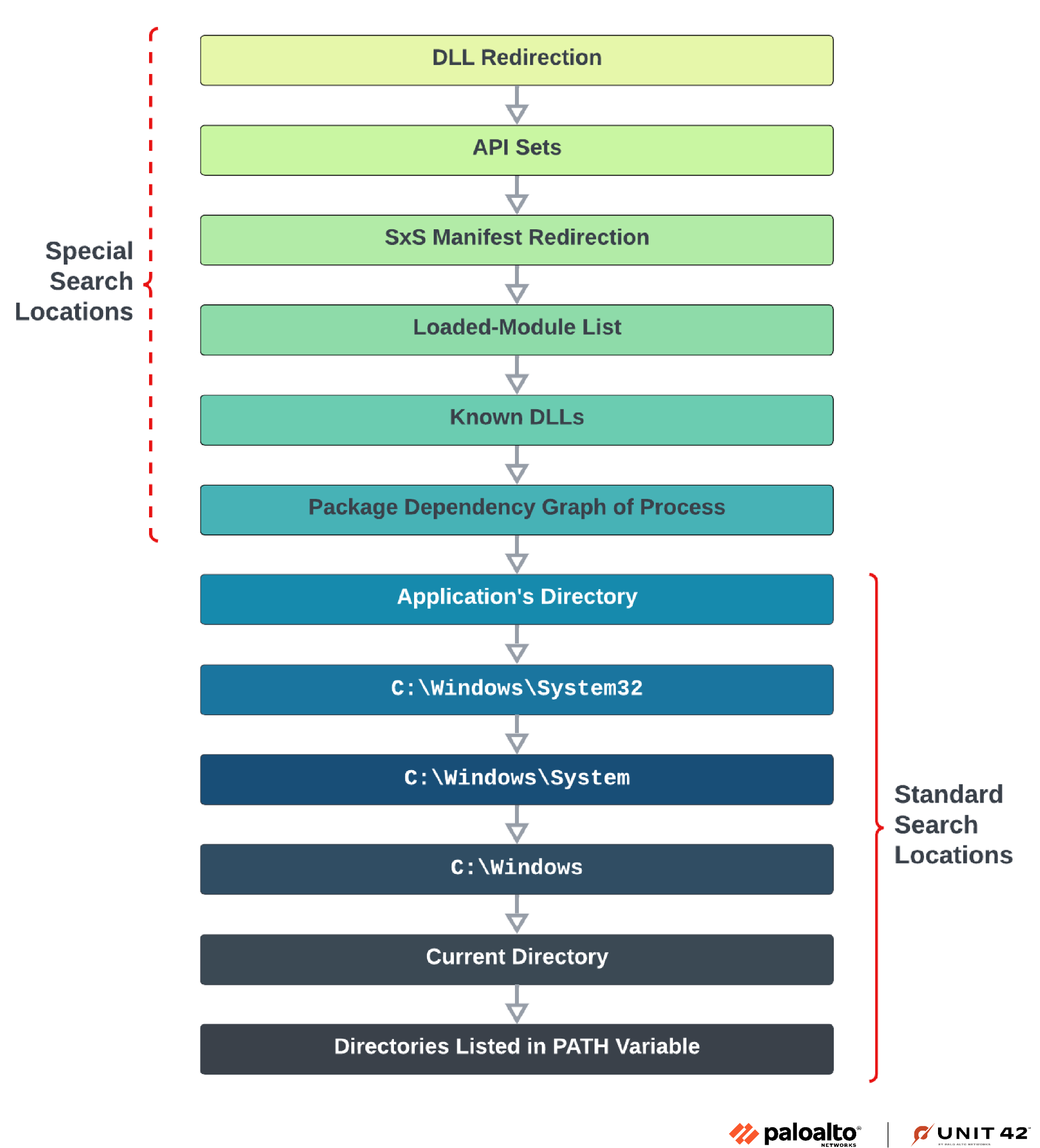
The search order is divided into two parts:
Special Search Locations: checked first, and includes mechanisms like DLL redirection, API sets, SxS manifest redirection, the loaded-module list, and the KnownDLLs registry key. These are harder to abuse. More details can be found in the official Microsoft documentation: Dynamic-Link Library Search Order.
Standard Search Locations: this is where most hijacking attacks happen. Windows searches in this order:
- The directory of the executable (
.exe) C:\Windows\System32C:\Windows\SystemC:\Windows- The current working directory
- Directories listed in the
PATHenvironment variable
- The directory of the executable (
The main idea is: the executable’s own directory is searched first. If an attacker can write a malicious DLL into that directory, it will be loaded before the legitimate one in System32 - and that’s the root cause of most DLL hijacking attacks.
FYI, to detect if an application is vulnerable to DLL hijacking, you can use tools like Process Monitor to observe the DLL loading behavior and see if it loads any DLLs by name without a full path - which will show a “NAME NOT FOUND” error for the legitimate DLL, indicating that it is vulnerable to hijacking(I will show this in the case study 2 later).
2.2. DLL Search Order Hijacking #
DLL Search Order Hijacking is the most classic and direct form in DLL hijacking. Attacker simply places a malicious DLL with the same name as a DLL the application needs into a directory that Windows searches before the directory containing the legitimate DLL(or sometimes the DLL just simply does not exist).
The most common target is the executable’s own directory, since it sits at the top of the standard search order. However, attackers can also abuse the PATH environment variable by inserting an attacker-controlled directory earlier in the list.
No function forwarding is needed, and the real DLL is not required - the malicious DLL fully replaces it. The downside is that if the application actually calls exported functions from that DLL, it may crash because those functions don’t exist in the fake DLL. This is where DLL Proxying becomes useful.
2.3. DLL Proxying #
DLL Proxying is a complementary technique often used together with Search Order Hijacking or Side-Loading. The problem it solves is simple: if you drop a fake DLL and the application tries to call functions from it that don’t exist, it will crash - which draws attention and breaks stealth.
DLL Proxying solves this by creating a malicious DLL that:
- Exports all the same functions as the legitimate DLL.
- Forwards every call to the real DLL (renamed, e.g.,
version_orig.dll). - Executes the payload (e.g., in
DllMain) during initialization.
I find this image which is veru helpful to understand the concept:
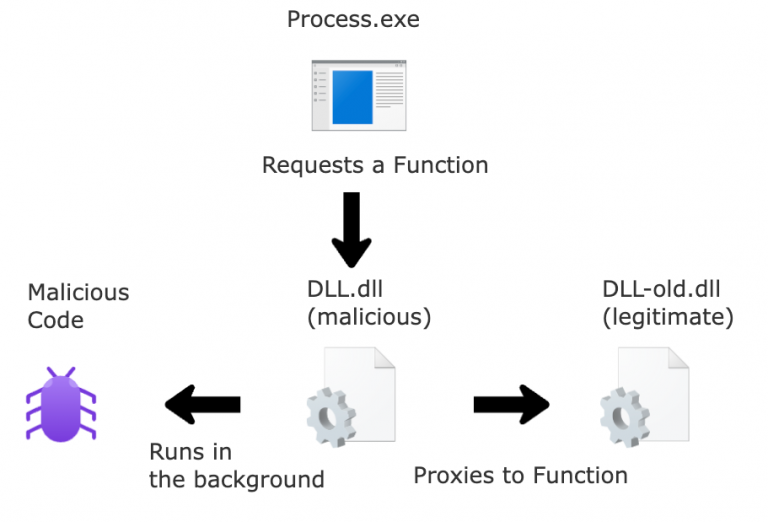
This way, the application continues to work normally after loading the malicious DLL, since all API calls are transparently proxied to the original. The attacker gets code execution and maintains stealth by preventing any visible disruption.
2.4. DLL Side-Loading #
To understand DLL Side-Loading precisely, we first need to understand Windows Side-by-Side (WinSxS) - the mechanism that gave birth to this technique.
WinSxS was introduced by Microsoft to solve the infamous “DLL Hell” problem - a situation where installing a new application would overwrite shared system DLLs with newer (or incompatible) versions, breaking other applications that depended on the old version.
The solution was application manifests: XML files (.manifest) that describe exactly which version of a DLL an application needs. Windows uses these manifests to load the correct versioned DLL from the WinSxS store, allowing multiple versions of the same DLL to coexist on the system.
However, this introduced a new problem: if the manifest is missing, ambiguous, or does not explicitly specify the DLL’s full path, Windows falls back to the standard DLL search order - and that’s the root cause of Side-Loading vulnerabilities.
How Side-Loading Works #
DLL Side-Loading exploits this fallback behavior. The attack setup is straightforward:
- The attacker finds a legitimate, signed executable (typically from a trusted vendor like an AV company, VPN client, or any well-known software) that loads a DLL by name only, without a full path.
- The attacker crafts a malicious DLL with the exact same name as the one the executable expects.
- Both the legitimate EXE and the malicious DLL are dropped into the same directory on the victim’s machine.
- When the victim runs the EXE, Windows searches the executable’s directory first - finds the malicious DLL - and loads it.
The legitimate EXE never “knows” it loaded a malicious DLL. From the OS’s perspective, everything looks normal: a trusted, signed binary is running and loading its dependencies.
Why It’s So Effective for Attackers #
There are several reasons why APT groups and red teamers favor this technique:
- Signed binary as a shield: Since the loader EXE is legitimate and signed, AV and EDR solutions are far less likely to flag the process. The malicious DLL runs inside a trusted process.
- Application allowlisting bypass: Security policies that only allow signed or whitelisted binaries to run are ineffective here - the EXE itself is allowlisted.
- No installation required: The attacker doesn’t need to tamper with any existing system files or installed applications. They simply drop two files anywhere they have write access.
- Blends into normal behavior: From a process tree perspective, the malicious code runs under a recognizable, benign process name.
The Difference From DLL Search Order Hijacking #
These two techniques are often confused because they share the same underlying mechanic - abusing the DLL search order. The distinction lies in the context and intention!:
| DLL Search Order Hijacking | DLL Side-Loading | |
|---|---|---|
| Target EXE | Already installed on victim’s machine | Brought by the attacker themselves |
| EXE is signed? | Not necessarily | Almost always - that’s the point |
| Write access needed | To a directory in the search path of an existing app | Anywhere the attacker can write |
In short: Search Order Hijacking hijacks an EXISTING application’s DLL loading. Side-Loading weaponizes a trusted but buggy binary by PLANTING it as an intentional payload delivery mechanism.
2.5. Phantom DLL Loading #
Phantom DLL Loading is a lesser-known but interesting variant. Instead of hijacking an existing DLL, the attacker targets a DLL that the application tries to load but doesn’t actually exist on the system - typically due to an implementation bug or a removed dependency.
The attacker simply plants their malicious DLL at the expected path. Since there’s no legitimate DLL to compete with, no proxying is needed.
A classic example is the Windows SearchIndexer.exe process, which attempts to load msfte.dll from System32 on startup - a file that does not exist by default on many Windows versions. If an attacker can write to System32 or manipulate the PATH, they can load arbitrary code with SYSTEM privileges.
2.6. COM Object Hijacking #
COM Object Hijacking is a particularly interesting variant because it bypasses the standard DLL search order entirely and instead abuses how Windows resolves COM objects through the registry. Unlike the techniques above, it does not require write access to the application’s directory or any directory in the standard search path - only access to the current user’s registry hive, which any low-privilege user can write to by design.
Background: What is COM? #
COM (Component Object Model) is a Microsoft framework that allows software components to communicate with each other regardless of the language they are written in. It supports features like interprocess communication, versioning, and dynamic object creation. In many cases, applications use COM as a mechanism to locate and load system DLLs at runtime - essentially querying the registry to find the path to a DLL identified by a CLSID (Class ID), a unique UUID assigned to each COM object.
The Registry Lookup Order #
When an application resolves a COM object, Windows checks the registry in the following order:
- HKCU\SOFTWARE\Classes\CLSID{CLSID} ← checked FIRST
- HKLM\SOFTWARE\Classes\CLSID{CLSID} ← fallback if not found in HKCU
The legitimate DLL path is typically registered under HKLM, which requires administrator privileges to modify. However, HKCU is writable by any low-privilege user - no elevation required.
This means: if an application queries a CLSID that does not exist in HKCU (resulting in a NAME NOT FOUND in Process Monitor), an attacker can simply create that registry key in HKCU pointing to a malicious DLL stored anywhere on the filesystem. The next time the application runs and queries that CLSID, it will find the attacker’s entry first and load the malicious DLL instead of the legitimate system one.
Discovery with Process Monitor #
To find COM hijacking candidates, filter Process Monitor as follows:
- Operation:
RegOpenKey - Path starts with:
HKCU - Result:
NAME NOT FOUND
Any process that exhibits this behavior is a candidate. Over a monitoring session of a few hours on a typical business workstation, numerous native Windows applications and third-party software can be observed querying CLSIDs in HKCU that do not yet exist - leaving them wide open for hijacking.
Why It’s Particularly Dangerous #
No write access to the app directory is needed - the attack surface is entirely within the user’s own registry hive.
Works against hardened applications - even applications stored in locked-down locations such as C:\Program Files\WindowsApps\ (Microsoft Store apps, the new Outlook OLK.exe, etc.) that cannot be reached via classic DLL Search Order Hijacking are vulnerable, because the COM lookup happens at a higher level before the standard search order is even consulted.
Persistence without elevation - every time the vulnerable application runs, the malicious DLL is loaded automatically, giving the attacker a persistent foothold with zero administrative privileges.
Wide blast radius - a single monitoring session is enough to collect dozens of hijackable CLSIDs across many different applications, making it trivial to cast a wide net.
Attack Steps #
Use Process Monitor to identify a target process performing a RegOpenKey on HKCU\SOFTWARE\Classes\CLSID{some-CLSID} with result NAME NOT FOUND. Note the CLSID value. Create the following registry key (no elevation required):
HKCU\SOFTWARE\Classes\CLSID\{CLSID}\InProcServer32
Set the default value to the full path of the malicious DLL, e.g.:
C:\Users\user\AppData\Local\Temp\bad.dll
The next time the application starts and queries that CLSID, it finds the attacker’s entry in HKCU first and loads the malicious DLL.
2.7. What is the difference? #
To summarize, here is a comparison of all four techniques:
| Technique | Needs Real DLL | Forwards Functions | Goal |
|---|---|---|---|
| DLL Search Order Hijacking | No | No | Replace a DLL by abusing search order |
| DLL Side-Loading | No | No | Run payload via a trusted, signed EXE |
| DLL Proxying | Yes | Yes | Run payload while keeping the app stable |
| Phantom DLL Loading | No | No | Plant a DLL where app expects one that’s missing |
Note: DLL Hijacking is the overarching term that covers all of the above. In practive, based on my observations, a real-world attack often combines multiple techniques - for example, Search Order Hijacking + DLL Proxying together, as demonstrated in the KeePassXC case study below.
Okay, I hope the above explanations are clear enough :D. Now, let’s move on to the real-world case study to see how these techniques can be seen in real-world scenarios.
3. Real-world case study 1: KeePassXC 2.6 #
3.1. Overall #
The topic here is not a single CVE, but rather a common class of vulnerability: Windows applications loading DLLs by name only (without specifying a full path), which leads to potential DLL Hijacking.
In this article, I use KeePassXC version 2.6.0 as an example to demonstrate these two techniques.
3.2. Analysis #
3.2.1. Flow analysis #
TLDR:
1. Place version.dll (proxy) next to the EXE file.

2. DllMain executes the payload.

3. All API calls are forwarded to version_orig.dll -> app runs normally after executing the payload.
First, the application may call something like LoadLibrary("version.dll") (using only the filename). You can observe this with Process Monitor, for example:
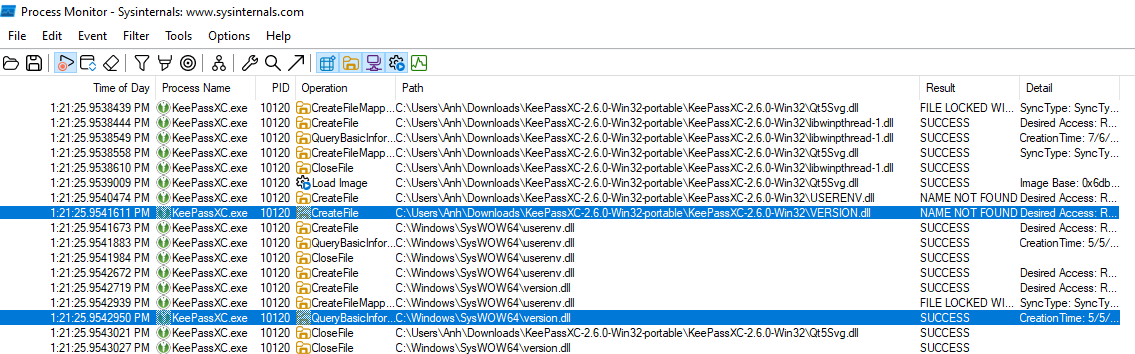
As shown in the image, the search order prioritizes the EXE’s directory → it searches in the directory of the executable first, and only then looks for version.dll in C:\Windows\SysWOW64. Therefore, if we create and place a version.dll in the same directory as the EXE, our DLL will be loaded first.
However, as mentioned above, if we simply create a random version.dll that contains our desired payload but does not care about how the application actually uses the DLL, then after loading the crafted DLL the application will crash because it cannot find the required APIs → the DLL hijacking attempt fails.
This is where DLL Proxying becomes necessary.
To implement this technique, we need two files:
- The legitimate DLL we want to proxy to:
target_orig.dll - The proxy DLL that executes our payload and forwards calls:
target.dll
Starting with target_orig.dll, extracting the export list is straightforward. We copy the legitimate DLL from C:\Windows\SysWOW64\ into our working folder and rename it to version_orig.dll.
To extract the export list from that DLL file, we use the Python pefile module (a Portable Executable parser):
import pefile

dll = pefile.PE('target_orig.dll')

print("EXPORTS")
for export in dll.DIRECTORY_ENTRY_EXPORT.symbols:
    if export.name:
        print('{}=target_orig.{} @{}'.format(export.name.decode(), export.name.decode(), export.ordinal))
The result is a version.def file containing the export list of the legitimate DLL, which is required to build version.dll later. Specifically, we iterate through the exported functions in version_orig.dll and print them in a format appropriate for a .def file.
Next, we prepare the C source file for the proxy DLL, version.c. In this example, I simply spawn calc.exe for demonstration purposes.
Finally, to compile and link, we use the mingw-w64 cross-compiler with the following command:
i686-w64-mingw32-gcc -shared -o version.dll version.c version.def -s
Where:
-shared: Build a DLL.-o version.dll: Output file isversion.dll(the proxy DLL).version.c version.def: Inputs are the C code and the export definition file.-s: Strip symbols to reduce file size and avoid exposing unnecessary information.
As a result, version.dll will be generated. This DLL will proxy all function calls to version_orig.dll, ensuring the application runs normally while still executing our payload during initialization. At that point, we simply copy both files into the same directory as the EXE to complete the attack - you can watch the demo video below for a clearer understanding.
During my research, I also found a similar case in the x64 version that nobody has exploited yet, so feel free to download it and experiment.
3.3. PoC Video #
Please watch the video here: https://youtu.be/DwriSx4Jel4
3.4. Summary #
Conditions for successful exploitation:
- KeePassXC 2.6.0 loads a DLL without using a full path, and is run from an attacker-controlled directory (e.g., Program Files if writable, or a portable folder).
- The victim only needs to run the application with normal user privileges (no UAC elevation required, because the hijack occurs in user mode).
- The attacker must plant
version.dll(proxy) andversion_orig.dllin the same directory before launching the EXE. - No initial high privileges are required for the attacker (a local unprivileged user is enough, as long as they have write access to the application directory).
Source and Sink
- Source: input from the DLL search path (uncontrolled / attacker-controlled via DLL planting).
- Sink: the location where the DLL is loaded (the
LoadLibrarycall, leading to execution ofDllMainin the malicious DLL).
Techniques combined to exploit
- DLL Hijacking: placing a fake DLL to abuse search order.
- DLL Proxying: exporting and forwarding all functions to the original DLL so the app continues to function.
- Payload execution: running malicious code inside
DllMain(e.g., popping calc.exe, or further escalation such as token duplication if LPE is needed). - Tooling: using
pefileto extract exports, andmingw-w64to compile the proxy DLL.
3.5. Developer’s Response & Discussion #
First of all, I want to thank the KeePassXC team for their quick response and willingness to engage in a constructive discussion about this issue. The author of the application said it is a functionality issue, not a security issue, so it is not assigned a CVE. However, it is still a security risk if an attacker can write to the application directory.
After that, they responded with two main arguments:

These are common responses from vendors when faced with DLL hijacking reports, and while they are not entirely wrong, they deserve a closer look.
Point 1: “Use the MSI installer” #
This is a valid mitigation - when installed via MSI, the application resides in C:\Program Files\, which requires administrative privileges to write to. A low-privilege attacker cannot plant a DLL there without UAC elevation.
However, this argument has a significant blind spot:
- Many users - especially in enterprise environments where they lack admin rights - rely on the portable version precisely because they cannot install via MSI(I asked some of my friends who work in enterprise environments for this point).
- In corporate settings, IT teams often distribute portable apps via shared network drives or USB sticks, where directory permissions may be more relaxed.
- The portable version is an officially supported distribution of KeePassXC, not an edge case or misuse. Dismissing its security posture is dismissing a significant portion of the user base.
Point 2: “A compromised system is already highly dangerous” #
This is the classic “assume breach = game over” argument, and it is partially true - if an attacker already has unrestricted access to your machine, you have bigger problems than DLL hijacking. However, I still feel a bit uncomfortable with this argument fundamentally misunderstanding the threat model:
- DLL hijacking does not require a “compromised system” in the traditional sense. It only requires write access to the application directory, which a local unprivileged user may legitimately have - for example, a portable app stored in the user’s home directory or
AppData. - More importantly, this technique is valuable as a step in an attack chain, not a standalone attack. Lets consider this scenario:
  Unprivileged local user
      → plants malicious DLL in KeePassXC portable directory
      → victim (admin) runs KeePassXC
      → payload executes in the context of the admin user
      → privilege escalation achieved
- This is exactly the kind of LPE scenario that security researchers care about. The attacker starts with minimal foothold and uses DLL hijacking as the first step!
4. Real-world case study 2: Riot Vanguard #
I will update later!
5. Appendix #
- Reference links:
- https://www.blackhillsinfosec.com/dll-hijacking-a-new-spin-on-proxying-your-shellcode/
- https://github.com/tothi/dll-hijack-by-proxying/tree/master
- https://lsecqt.github.io/Red-Teaming-Army/malware-development/weaponizing-dll-hijacking-via-dll-proxying/
- https://blog.slowerzs.net/posts/thievingfox/ https://www.blackhillsinfosec.com/a-different-take-on-dll-hijacking/ https://unit42.paloaltonetworks.com/dll-hijacking-techniques/ https://cloud.google.com/blog/topics/threat-intelligence/abusing-dll-misconfigurations https://cloud.google.com/blog/topics/threat-intelligence/dll-side-loading-another-blind-spot-for-anti-virus https://cloud.google.com/blog/topics/threat-intelligence/malware-persistence-windows-registry